
Data Vault diagrams,
drawn at the speed of thought
A lightweight browser-based editor for clear, modern Data Vault diagrams. Fast modeling, visual clarity, and a minimal backend footprint instead of heavy metadata management.
Hub
Customer
customer_hk · BINARY(16)
customer_bk · VARCHAR(64)
load_dts · TIMESTAMP
Export
Built for Data Vault 2
Every node type you actually model with
Not a generic ER tool with a Data Vault sticker. Purpose-built primitives, column-level metadata, and several export formats for use with external tools.
Six Data Vault node types
Hub, Link, Satellite, Reference Table, PIT Table, and Bridge Table. Each with handles, colors, and column semantics that match the methodology.
Column-level metadata
Technical names, data types, and satellite-to-hub parent relationships. Model the structure, not just the boxes.
Generic tables, notes, groups
Source staging tables, annotations, and visual frames for when the model needs context beyond raw Data Vault.
Export PNG, PDF, JSON, DBML
Drop a diagram into a doc, hand JSON to a script, or push DBML into dbdiagram.io.
Import JSON & DBML
Round-trip your diagrams. Bring existing DBML models onto the canvas in one step.
Into the canvas
Persistent diagrams
Cloud-backed storage with autosave and a diagram library. Pick up where you left off.
Prefer Microsoft Visio? Grab the Data Vault stencils
The original Visual Data Vault stencils for Microsoft Visio with Hub, Link, Satellite, and the rest as drag-and-drop shapes. Leave your details once and the download opens right away.
Already part of countless Data Vault diagrams in the wild. Drop the file into your Visio "My Shapes" folder and open from any document.
Visual Data Vault Shapes
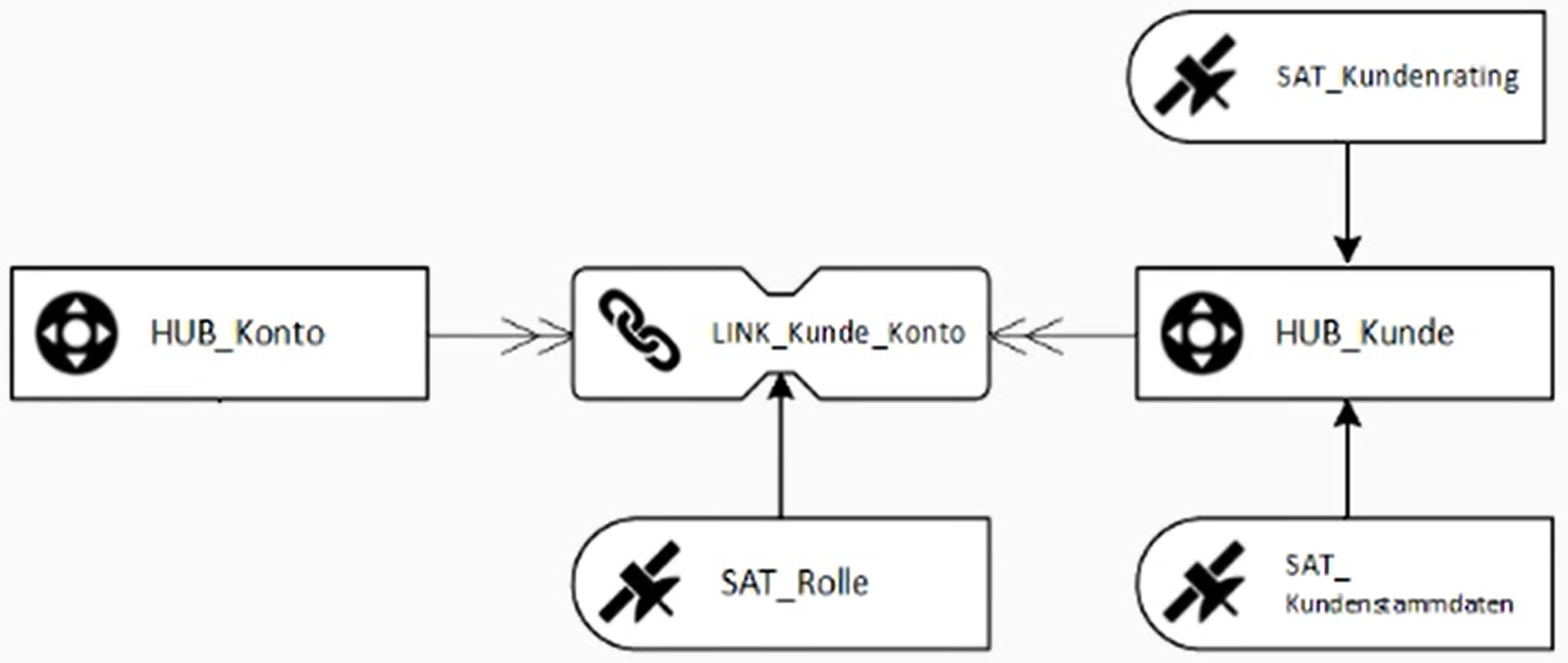
6 shapes · .vssx · ~40 KB
From blank canvas to handoff
Sketch Persist Export
A workflow short enough to fit in a sentence, with a tool that doesn't slow it down.
Sketch
Drag a Hub onto the canvas, connect a Link, hang Satellites off it. Add columns inline.
Persist
Sign in once. Diagrams autosave to your account every 5 seconds, configurable in settings.
Export
Ship a PNG into your spec doc, a PDF to a stakeholder, or DBML/JSON into your toolchain.
The difference
Generic ER tools don't know what a Satellite is
Visual Data Vault does. The node types, colors, handles, and relationships are shaped by Data Vault 2, not retrofitted onto a generic shape library.
Generic ER tools
Visual Data Vault
Node primitives
Rectangle, rectangle, rectangle.
Node primitives
Hub, Link, Satellite, Reference, PIT, and Bridge, each semantically distinct.
Color language
Whatever you remember to pick.
Color language
A pastel palette tuned for dense Data Vault diagrams.
Column metadata
Free-text inside a shape.
Column metadata
Typed columns, satellite parent references, data type fields.
Exports
PNG, maybe SVG.
Exports
PNG, PDF, JSON, and DBML out of the box.
Footprint
Cloud workspace, billing, seats.
Footprint
Lightweight, browser-based, minimal backend.
What Visual Data Vault doesn't do (yet): real-time multi-user editing, team workspaces, more export options. We're keeping the surface area small on purpose.
Who's behind this
Built by Scalefree, the world leader in Data Vault
Visual Data Vault is built by the consultants and trainers at Scalefree, certified Data Vault 2 specialists and partners of the Data Vault Alliance.
- Certified Data Vault 2 training and consulting, at every scale.
- Partner of the Data Vault Alliance, founded by Dan Linstedt, the inventor of Data Vault.
- Authors of The Data Vault Handbook: Core Concepts and Modern Applications.
- Active data warehouse, dbt, and data platform engineers shaped by what we use on real engagements.

Answers before you start
Frequently asked questions
Quick answers about access, formats, Data Vault coverage, and how the editor fits into existing teams.
Does Visual Data Vault run in the browser
Yes. You can open the editor in a modern browser without installing a desktop application. The canvas, modeling tools, and exports are available directly from the web app.
Do I need an account to use the editor
You can open the editor quickly from the landing page. Creating an account lets you save diagrams, continue work later, and keep settings connected to your profile.
Which Data Vault objects are supported
The editor supports Hub, Link, Satellite, Reference Table, PIT Table, and Bridge Table nodes, plus generic tables, notes, and groups for additional modeling context.
Which import and export formats are available
You can export diagrams as PNG, PDF, JSON, and DBML. JSON and DBML can also be imported so diagrams can move between the editor and external toolchains.
Can I still use Microsoft Visio stencils
Yes. If your team prefers Visio, you can request the Data Vault stencil package for Microsoft Visio 2016 and newer on Windows.
What happens to my data
Account based diagrams are stored so you can return to them later. Cookie and privacy preferences are handled through the consent tools and legal pages linked in the footer.
How is Scalefree involved
Visual Data Vault is built by Scalefree International GmbH, the world leader in Data Vault. The editor is designed around practical Data Vault 2 modeling workflows.
Start modeling with no setup, no install, no fee
Sign in or create an account, then open the editor in your browser.
vvisual-data-vault-editor-v0.14.0